我的书签
我的书签
 添加书签
添加书签 移除书签
移除书签一、第一个例子
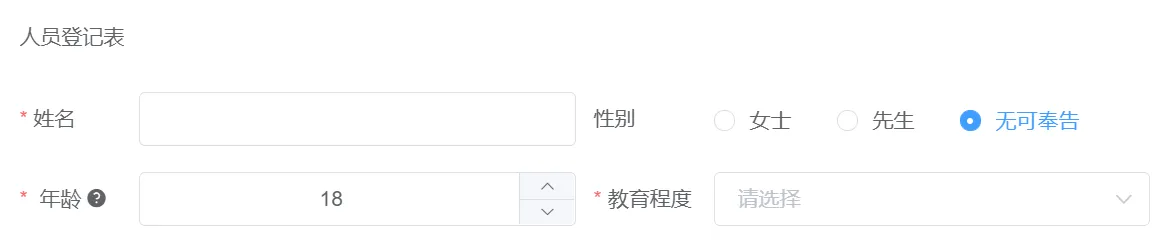
1. 效果演示
一个简单的人员信息登记表:
点此在线运行代码:
2. 在线体验
表单JSON如下,复制JSON,在表单设计器(点此进入)中选择“导入JSON”即可看到效果:
{"widgetList": [{"type": "grid","category": "container","icon": "grid","cols": [{"type": "grid-col","category": "container","icon": "grid-col","internal": true,"widgetList": [{"type": "static-text","icon": "static-text","formItemFlag": false,"options": {"name": "static-text20799","columnWidth": "200px","hidden": false,"textContent": "人员登记表","customClass": [],"onCreated": "","onMounted": "","label": "static-text"},"displayName": "静态文字","id": "static-text20799"}],"options": {"name": "gridCol96077","hidden": false,"span": 12,"customClass": []},"id": "grid-col-96077"}],"options": {"name": "grid64343","hidden": false,"gutter": 12,"customClass": []},"displayName": "栅格","id": "grid64343"},{"type": "grid","category": "container","icon": "grid","cols": [{"type": "grid-col","category": "container","icon": "grid-col","internal": true,"widgetList": [{"type": "input","icon": "text-field","formItemFlag": true,"options": {"name": "input97458","label": "姓名","labelAlign": "","type": "text","defaultValue": "","placeholder": "","columnWidth": "200px","size": "","labelWidth": null,"labelHidden": false,"readonly": false,"disabled": false,"hidden": false,"clearable": true,"showPassword": false,"required": true,"validation": "","validationHint": "","customClass": [],"labelIconClass": null,"labelIconPosition": "rear","labelTooltip": null,"minLength": null,"maxLength": null,"showWordLimit": false,"prefixIcon": "","suffixIcon": "","appendButton": false,"buttonDisabled": false,"buttonIcon": "el-icon-search","onCreated": "","onMounted": "","onChange": "","onFocus": "","onBlur": "","onValidate": ""},"displayName": "单行输入","id": "input97458"}],"options": {"name": "gridCol66750","hidden": false,"span": 12},"id": "grid-col-66750"},{"type": "grid-col","category": "container","icon": "grid-col","internal": true,"widgetList": [{"type": "radio","icon": "radio-field","formItemFlag": true,"options": {"name": "radio61394","label": "性别","labelAlign": "","defaultValue": 3,"columnWidth": "200px","size": "","displayStyle": "inline","labelWidth": null,"labelHidden": false,"disabled": false,"hidden": false,"optionItems": [{"label": "女士","value": 1},{"label": "先生","value": 2},{"label": "无可奉告","value": 3}],"required": false,"validation": "","validationHint": "","customClass": [],"labelIconClass": null,"labelIconPosition": "rear","labelTooltip": null,"onCreated": "","onMounted": "","onChange": "","onValidate": ""},"displayName": "单选项","id": "radio61394"}],"options": {"name": "gridCol16505","hidden": false,"span": 12},"id": "grid-col-16505"}],"options": {"name": "grid88004","hidden": false,"gutter": 12,"customClass": []},"displayName": "栅格","id": "grid88004"},{"type": "grid","category": "container","icon": "grid","cols": [{"type": "grid-col","category": "container","icon": "grid-col","internal": true,"widgetList": [{"type": "number","icon": "number-field","formItemFlag": true,"options": {"name": "number106358","label": "年龄","labelAlign": "","defaultValue": "18","placeholder": "","columnWidth": "200px","size": "","labelWidth": null,"labelHidden": false,"disabled": false,"hidden": false,"required": true,"validation": "","validationHint": "","customClass": [],"labelIconClass": "el-icon-question","labelIconPosition": "rear","labelTooltip": "年龄大于18岁的成年人方可登记","min": 0,"max": 100,"precision": 0,"step": 1,"controlsPosition": "right","onCreated": "","onMounted": "","onChange": "","onFocus": "","onBlur": "","onValidate": ""},"displayName": "计数器","id": "number106358"}],"options": {"name": "gridCol101163","hidden": false,"span": 12},"id": "grid-col-101163"},{"type": "grid-col","category": "container","icon": "grid-col","internal": true,"widgetList": [{"type": "select","icon": "select-field","formItemFlag": true,"options": {"name": "select62173","label": "教育程度","labelAlign": "","defaultValue": "","placeholder": "","columnWidth": "200px","size": "","labelWidth": null,"labelHidden": false,"disabled": false,"hidden": false,"clearable": true,"filterable": false,"allowCreate": false,"remote": false,"automaticDropdown": false,"multiple": false,"multipleLimit": 0,"optionItems": [{"value": "1","label": "社会人"},{"value": "2","label": "高中"},{"value": "3","label": "大学"},{"value": "4","label": "研究生"},{"value": "5","label": "博士及以上"}],"required": true,"validation": "","validationHint": "","customClass": [],"labelIconClass": null,"labelIconPosition": "rear","labelTooltip": null,"onCreated": "","onMounted": "","onRemoteQuery": "","onChange": "","onFocus": "","onBlur": "","onValidate": ""},"displayName": "下拉选项","id": "select62173"}],"options": {"name": "gridCol46272","hidden": false,"span": 12,"customClass": []},"id": "grid-col-46272"}],"options": {"name": "grid75579","hidden": false,"gutter": 12},"id": "grid75579"}],"formConfig": {"labelWidth": 80,"labelPosition": "left","size": "","labelAlign": "label-left-align","cssCode": "","customClass": "","functions": "","layoutType": "PC","onFormCreated": "","onFormMounted": "","onFormDataChange": "","onFormValidate": ""}}
二、高级一点的例子——交互事件与API方法
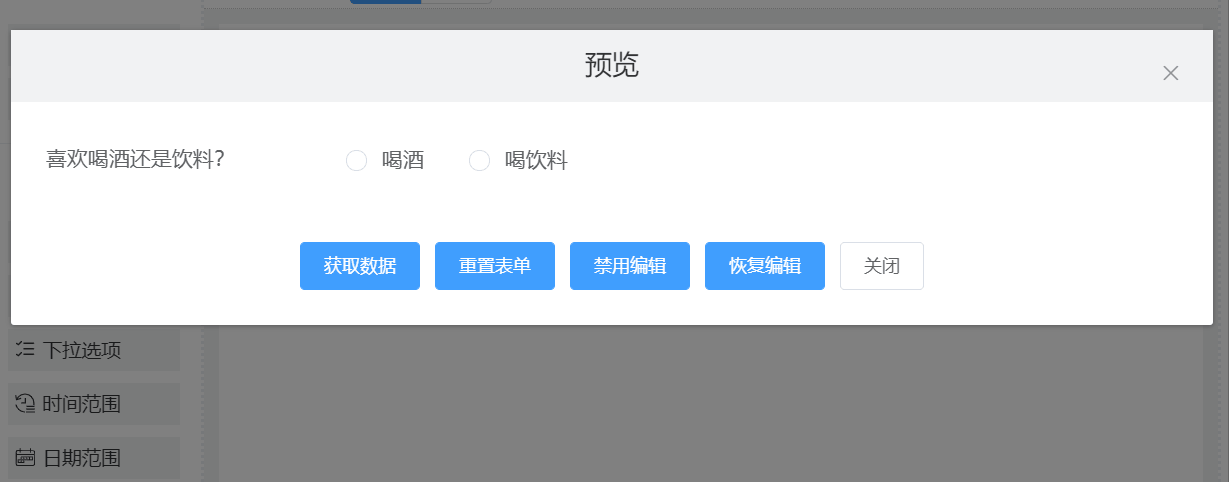
1. 效果演示
动态切换组件显示
点此在线运行代码:https://jsbin.com/baduhex/edit?html,output
2. 在线体验
表单JSON如下,复制以下JSON内容,在表单设计器(点此进入)中选择“导入JSON”即可看到效果:
{"widgetList": [{"type": "grid","category": "container","icon": "grid","cols": [{"type": "grid-col","category": "container","icon": "grid-col","internal": true,"widgetList": [{"type": "radio","icon": "radio-field","formItemFlag": true,"options": {"name": "drinkRadio","label": "喜欢喝酒还是饮料?","labelAlign": "","defaultValue": null,"columnWidth": "200px","size": "","displayStyle": "inline","labelWidth": null,"labelHidden": false,"disabled": false,"hidden": false,"optionItems": [{"label": "喝酒","value": 1},{"label": "喝饮料","value": 2}],"required": false,"validation": "","validationHint": "","customClass": [],"labelIconClass": null,"labelIconPosition": "rear","labelTooltip": null,"onCreated": "","onMounted": "","onChange": "var alcoholChkWidget = this.getWidgetRef('alcoholChk')\nvar drinkChkWidget = this.getWidgetRef('drinkChk')\n\nif (value === 1) {\n alcoholChkWidget.setHidden(false)\n drinkChkWidget.setHidden(true)\n} else {\n alcoholChkWidget.setHidden(true)\n drinkChkWidget.setHidden(false)\n}","onValidate": ""},"displayName": "单选项","id": "radio98420"}],"options": {"name": "gridCol89539","hidden": false,"span": 24},"id": "grid-col-89539"},{"type": "grid-col","category": "container","icon": "grid-col","internal": true,"widgetList": [{"type": "checkbox","icon": "checkbox-field","formItemFlag": true,"options": {"name": "alcoholChk","label": "喝什么酒","labelAlign": "","defaultValue": [],"columnWidth": "200px","size": "","displayStyle": "inline","labelWidth": null,"labelHidden": false,"readonly": false,"disabled": false,"hidden": true,"optionItems": [{"label": "茅台","value": 1},{"label": "二锅头","value": 2},{"label": "伏尔加","value": 3}],"required": false,"validation": "","validationHint": "","customClass": [],"labelIconClass": null,"labelIconPosition": "rear","labelTooltip": null,"onCreated": "","onMounted": "","onChange": "","onValidate": ""},"displayName": "多选项","id": "checkbox46135"}],"options": {"name": "gridCol76644","hidden": false,"span": 24,"customClass": []},"id": "grid-col-76644"},{"type": "grid-col","category": "container","icon": "grid-col","internal": true,"widgetList": [{"type": "checkbox","icon": "checkbox-field","formItemFlag": true,"options": {"name": "drinkChk","label": "喝啥子饮料","labelAlign": "","defaultValue": [],"columnWidth": "200px","size": "","displayStyle": "inline","labelWidth": null,"labelHidden": false,"readonly": false,"disabled": false,"hidden": true,"optionItems": [{"label": "肥宅水","value": 1},{"label": "白花蛇草水","value": 2},{"label": "农夫山泉有点田","value": 3}],"required": false,"validation": "","validationHint": "","customClass": "","labelIconClass": null,"labelIconPosition": "rear","labelTooltip": null,"onCreated": "","onMounted": "","onChange": "","onValidate": ""},"displayName": "多选项","id": "checkbox48765"}],"options": {"name": "gridCol17019","hidden": false,"span": 24},"id": "grid-col-17019"}],"options": {"name": "grid85701","hidden": false,"gutter": 12,"customClass": []},"displayName": "栅格","id": "grid85701"}],"formConfig": {"labelWidth": 200,"labelPosition": "left","size": "","labelAlign": "label-left-align","cssCode": "","customClass": "","functions": "","layoutType": "PC","onFormCreated": "","onFormMounted": "","onFormDataChange": "","onFormValidate": ""}}
3. 实现思路解说
交互逻辑的实现方法:在drinkType组件的onChange事件中编写处理代码:
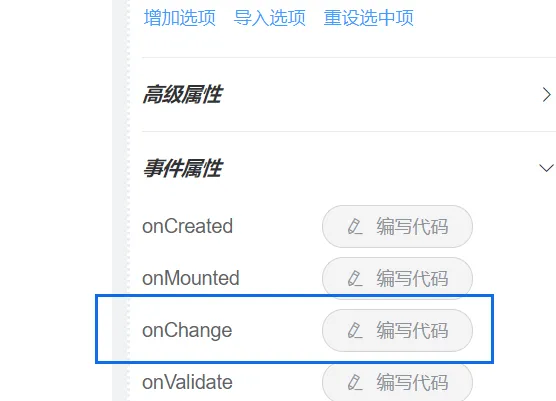
var alcoholChkWidget = this.getWidgetRef('alcoholChk')var drinkChkWidget = this.getWidgetRef('drinkChk')if (value === 1) {alcoholChkWidget.setHidden(false)drinkChkWidget.setHidden(true)} else {alcoholChkWidget.setHidden(true)drinkChkWidget.setHidden(false)}
三、更高级一点的例子——子表单和计算字段
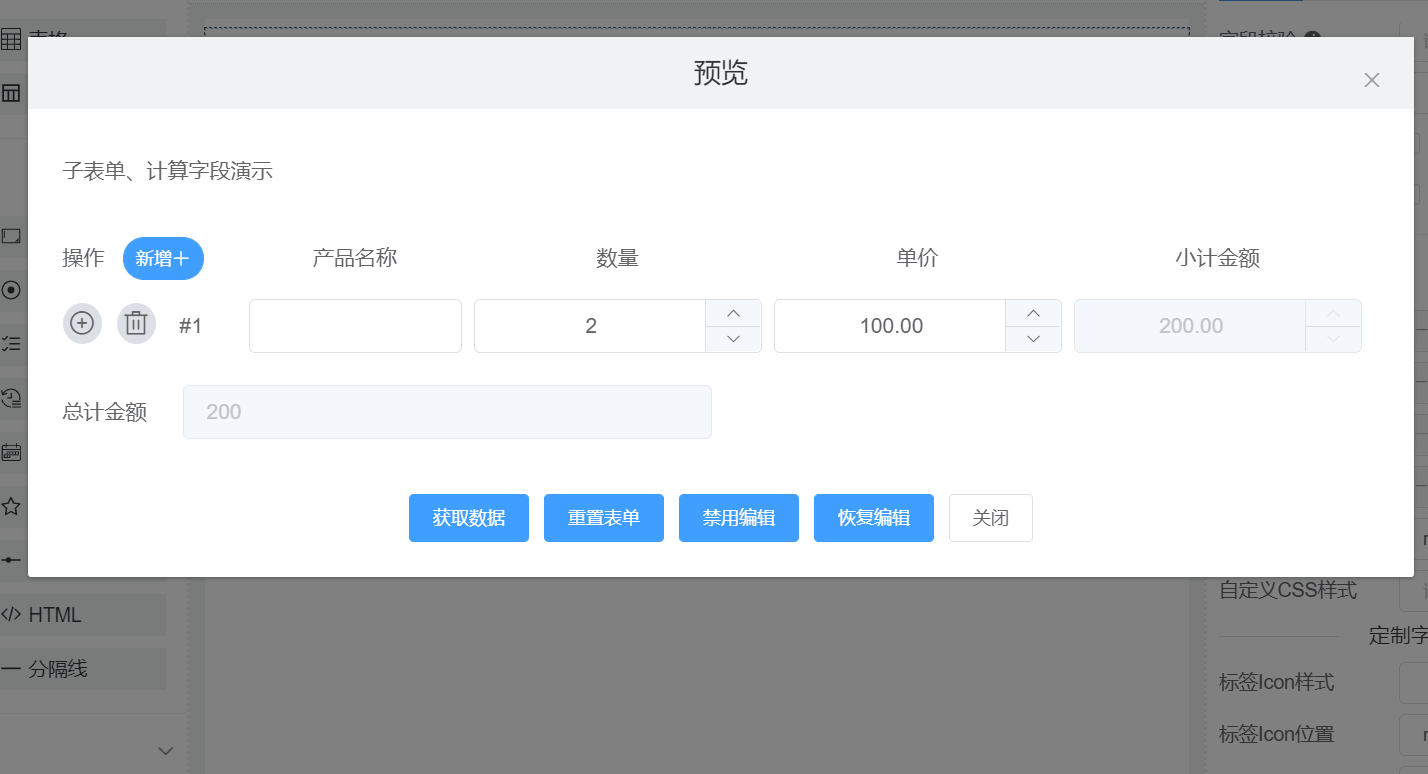
1. 效果演示
子表单添加、删除行时,计算单行结果和累计结果:
点此在线运行代码:https://jsbin.com/wofozir/edit?html,output
2. 在线体验
表单JSON如下,复制下列JSON,在表单设计器(点此进入)中选择“导入JSON”即可看到效果:
{"widgetList": [{"type": "grid","category": "container","icon": "grid","cols": [{"type": "grid-col","category": "container","icon": "grid-col","internal": true,"widgetList": [{"type": "static-text","icon": "static-text","formItemFlag": false,"options": {"name": "static-text55175","columnWidth": "200px","hidden": false,"textContent": "子表单、计算字段演示","customClass": [],"onCreated": "","onMounted": "","label": "static-text"},"displayName": "静态文字","id": "static-text55175"}],"options": {"name": "gridCol114213","hidden": false,"span": 12},"id": "grid-col-114213"},{"type": "grid-col","category": "container","icon": "grid-col","internal": true,"widgetList": [],"options": {"name": "gridCol80092","hidden": false,"span": 12},"id": "grid-col-80092"}],"options": {"name": "grid115477","hidden": false,"gutter": 12,"customClass": []},"displayName": "栅格","id": "grid115477"},{"type": "sub-form","category": "container","icon": "sub-form","widgetList": [{"type": "input","icon": "text-field","formItemFlag": true,"options": {"name": "pName","label": "产品名称","type": "text","defaultValue": "","placeholder": "","columnWidth": "150px","size": "","labelWidth": null,"labelHidden": false,"readonly": false,"disabled": false,"hidden": false,"clearable": true,"showPassword": false,"required": false,"validation": "","validationHint": "","customClass": [],"labelIconClass": null,"labelIconPosition": "rear","labelTooltip": null,"minLength": null,"maxLength": null,"showWordLimit": false,"prefixIcon": "","suffixIcon": "","appendButton": false,"buttonDisabled": false,"buttonIcon": "el-icon-search","onCreated": "","onMounted": "","onChange": "","onValidate": ""},"displayName": "Input","id": "input65393"},{"type": "number","icon": "number-field","formItemFlag": true,"options": {"name": "pNum","label": "数量","defaultValue": "1","placeholder": "","columnWidth": "200px","size": "","labelWidth": null,"labelHidden": false,"readonly": false,"disabled": false,"hidden": false,"required": false,"validation": "","validationHint": "","customClass": [],"labelIconClass": null,"labelIconPosition": "rear","labelTooltip": null,"min": 0,"max": 100,"precision": 0,"step": 1,"controlsPosition": "right","onCreated": "","onMounted": "","onChange": "recalcRowAmount(this, rowId)","onValidate": ""},"displayName": "Number","id": "number81340"},{"type": "number","icon": "number-field","formItemFlag": true,"options": {"name": "pPrice","label": "单价","defaultValue": "100","placeholder": "","columnWidth": "200px","size": "","labelWidth": null,"labelHidden": false,"readonly": false,"disabled": false,"hidden": false,"required": false,"validation": "","validationHint": "","customClass": [],"labelIconClass": null,"labelIconPosition": "rear","labelTooltip": null,"min": 0,"max": 10000,"precision": 2,"step": 1,"controlsPosition": "right","onCreated": "","onMounted": "","onChange": "recalcRowAmount(this, rowId)\n","onValidate": ""},"displayName": "Number","id": "number114595"},{"type": "number","icon": "number-field","formItemFlag": true,"options": {"name": "pAmount","label": "小计金额","defaultValue": 0,"placeholder": "","columnWidth": "200px","size": "","labelWidth": null,"labelHidden": false,"readonly": true,"disabled": true,"hidden": false,"required": false,"validation": "","validationHint": "","customClass": [],"labelIconClass": null,"labelIconPosition": "rear","labelTooltip": null,"min": 0,"max": 1000000,"precision": 2,"step": 1,"controlsPosition": "right","onCreated": "","onMounted": "","onChange": "let taRef = this.getWidgetRef('totalAmount')\nrecalcSubFormTotal(subFormData, 'pAmount', taRef)\n","onValidate": ""},"displayName": "Number","id": "number35019"}],"options": {"name": "sub-form7238","showBlankRow": true,"showRowNumber": true,"labelAlign": "label-center-align","hidden": false,"customClass": [],"onSubFormRowChange": "let taRef = this.getWidgetRef('totalAmount')\nrecalcSubFormTotal(subFormData, 'pAmount', taRef)\n","onSubFormRowDelete": "","onSubFormRowAdd": "","onSubFormRowInsert": ""},"displayName": "SubForm","id": "sub-form7238"},{"type": "grid","category": "container","icon": "grid","cols": [{"type": "grid-col","category": "container","icon": "grid-col","internal": true,"widgetList": [{"type": "input","icon": "text-field","formItemFlag": true,"options": {"name": "totalAmount","label": "总计金额","type": "text","defaultValue": "","placeholder": "","columnWidth": "200px","size": "","labelWidth": null,"labelHidden": false,"readonly": true,"disabled": true,"hidden": false,"clearable": true,"showPassword": false,"required": false,"validation": "","validationHint": "","customClass": [],"labelIconClass": null,"labelIconPosition": "rear","labelTooltip": null,"minLength": null,"maxLength": null,"showWordLimit": false,"prefixIcon": "","suffixIcon": "","appendButton": false,"buttonDisabled": false,"buttonIcon": "el-icon-search","onCreated": "","onMounted": "","onChange": "","onValidate": ""},"displayName": "Input","id": "input55898"}],"options": {"name": "gridCol33828","hidden": false,"span": 12},"id": "grid-col-33828"},{"type": "grid-col","category": "container","icon": "grid-col","internal": true,"widgetList": [{"type": "input","icon": "text-field","formItemFlag": true,"options": {"name": "totalCount","label": "total count","type": "text","defaultValue": "","placeholder": "","columnWidth": "200px","size": "","labelWidth": null,"labelHidden": false,"readonly": true,"disabled": false,"hidden": true,"clearable": true,"showPassword": false,"required": false,"validation": "","validationHint": "","customClass": [],"labelIconClass": null,"labelIconPosition": "rear","labelTooltip": null,"minLength": null,"maxLength": null,"showWordLimit": false,"prefixIcon": "","suffixIcon": "","appendButton": false,"buttonDisabled": false,"buttonIcon": "el-icon-search","onCreated": "","onMounted": "","onChange": "","onValidate": ""},"displayName": "Input","id": "input77431"}],"options": {"name": "gridCol69043","hidden": false,"span": 12,"customClass": []},"id": "grid-col-69043"}],"options": {"name": "grid55046","hidden": false,"gutter": 12,"customClass": []},"displayName": "Grid","id": "grid55046"}],"formConfig": {"labelWidth": 80,"labelPosition": "left","size": "","labelAlign": "label-left-align","cssCode": "","customClass": [],"functions": "function myAlert(msg) {\n alert(msg)\n}\n\nfunction recalcRowAmount(changeObj, rowId) {\n let numR = changeObj.getWidgetRef('pNum' + '@row' + rowId)\n let priceR = changeObj.getWidgetRef('pPrice' + '@row' + rowId)\n let amountR = changeObj.getWidgetRef('pAmount' + '@row' + rowId)\n let amountMoney = numR.getValue() * 1 * priceR.getValue()\n amountR.setValue(amountMoney)\n}\n\nfunction recalcSubFormTotal(subFormData, rowFieldName, totalFieldRef) {\n let tc = 0\n if (!!subFormData && (subFormData.length > 0)) {\n subFormData.forEach(function(row) {\n tc += row[rowFieldName] * 1\n })\n }\n totalFieldRef.setValue(tc)\n}\n","layoutType": "PC","onFormCreated": "","onFormMounted": "","onFormDataChange": "","onFormValidate": ""}}
3. 实现思路解说
计算字段实现方法:
(1) 在表单全局函数中定义单行计算函数recalcRowAmount、累计计算函数recalcSubFormTotal;
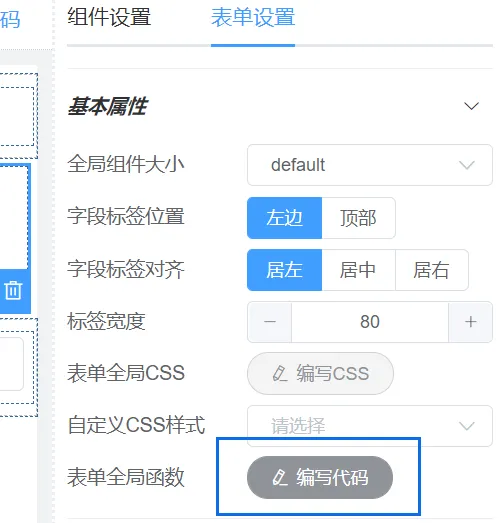
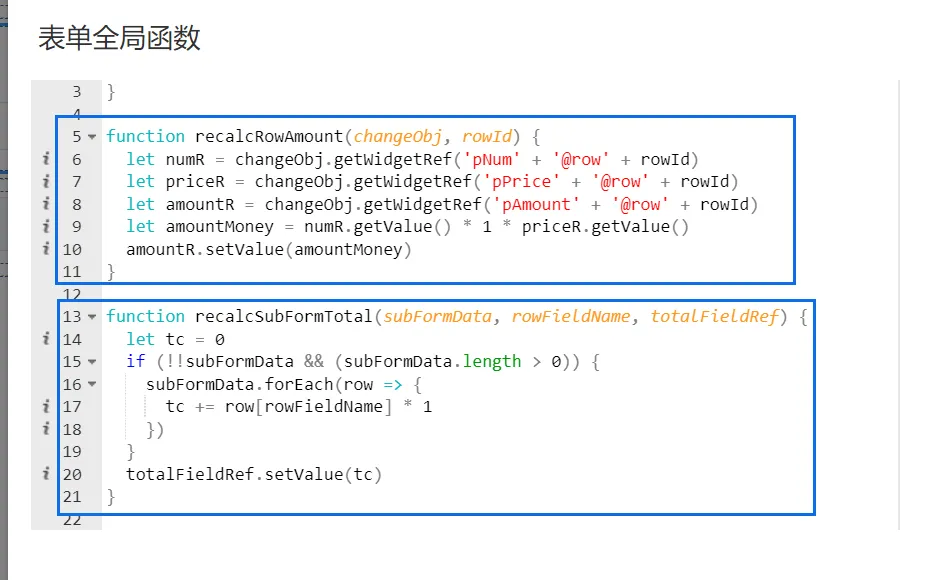
(2)在数量、单价字段的onChange事件中调用recalcRowAmount进行单行计算;
(3)在小计金额字段的onChange事件中调用recalcSubFormTotal进行累计计算;
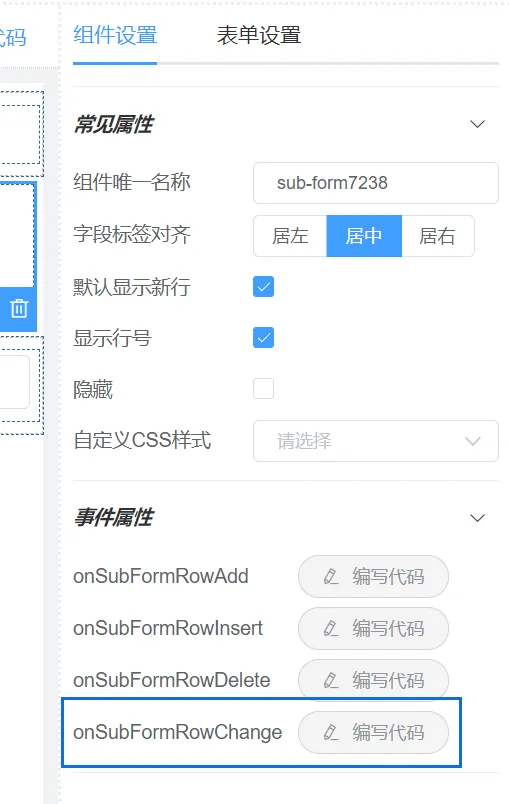
(4)为了在子表单删除、新增行后也能重新计算累计金额,需要在子表单的onSubFormRowChange事件中调用recalcSubFormTotal进行累计计算。注:子表单的onSubFormRowChange事件在新增行、插入行、删除行时被触发。
(5)通过以上步骤,子表单的单行计算、累计计算已实现。
四、第四个例子——下拉组件选择联动
1. 效果演示
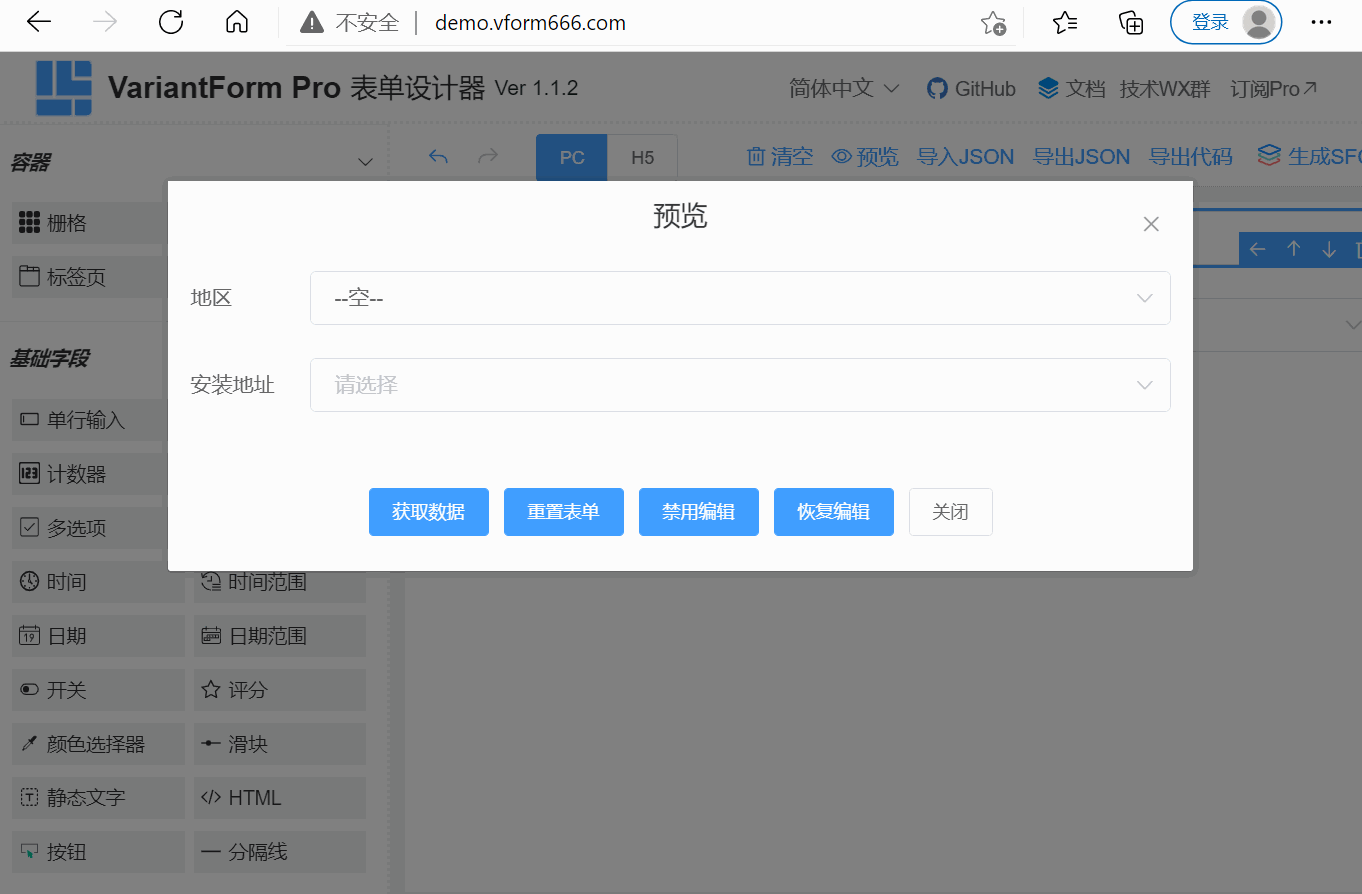
当地区选项改变后,安装地址的选项联动变化
2. 在线体验
表单JSON如下,复制JSON,在表单设计器(点此进入)中选择“导入JSON”即可看到效果:
{"widgetList": [{"type": "select","icon": "select-field","formItemFlag": true,"options": {"name": "citySelect","label": "地区","labelAlign": "","defaultValue": "","placeholder": "","columnWidth": "200px","size": "","labelWidth": null,"labelHidden": false,"disabled": false,"hidden": false,"clearable": true,"filterable": false,"allowCreate": false,"remote": false,"automaticDropdown": false,"multiple": false,"multipleLimit": 0,"optionItems": [],"required": false,"validation": "","validationHint": "","customClass": [],"labelIconClass": null,"labelIconPosition": "rear","labelTooltip": null,"onCreated": "","onMounted": "","onRemoteQuery": "","onChange": "var addressAPI = 'https://www.fastmock.site/mock/2de212e0dc4b8e0885fea44ab9f2e1d0/vform/getAddress?cityId='\nvar addressSelectR = this.getWidgetRef('addressSelect')\n\naxios.get(addressAPI + value).then(function(res) {\n addressSelectR.loadOptions(res.data.data)\n \n //if (!value) {\n // addressSelectR.setValue(null)\n //}\n}).catch(function(error) {\n console.error(error)\n})\n\naddressSelectR.setValue(null)\n","onFocus": "","onBlur": "","onValidate": ""},"id": "select78413"},{"type": "select","icon": "select-field","formItemFlag": true,"options": {"name": "addressSelect","label": "安装地址","labelAlign": "","defaultValue": "","placeholder": "","columnWidth": "200px","size": "","labelWidth": null,"labelHidden": false,"disabled": false,"hidden": false,"clearable": true,"filterable": false,"allowCreate": false,"remote": false,"automaticDropdown": false,"multiple": false,"multipleLimit": 0,"optionItems": [],"required": false,"validation": "","validationHint": "","customClass": "","labelIconClass": null,"labelIconPosition": "rear","labelTooltip": null,"onCreated": "","onMounted": "","onRemoteQuery": "","onChange": "","onFocus": "","onBlur": "","onValidate": ""},"id": "select90599"}],"formConfig": {"modelName": "formData","refName": "vForm","rulesName": "rules","labelWidth": 80,"labelPosition": "left","size": "","labelAlign": "label-left-align","cssCode": "","customClass": "","functions": "","layoutType": "PC","onFormCreated": "","onFormMounted": "var citySelectR = this.getWidgetRef('citySelect')\n\naxios.get('https://www.fastmock.site/mock/2de212e0dc4b8e0885fea44ab9f2e1d0/vform/getCity').then(function(res) {\n citySelectR.loadOptions(res.data.data)\n}).catch(function(error) {\n console.error(error)\n})","onFormDataChange": ""}}
3. 实现思路解说
(1)在表单的onFormMounted事件中加载地区选项,如下图所示:
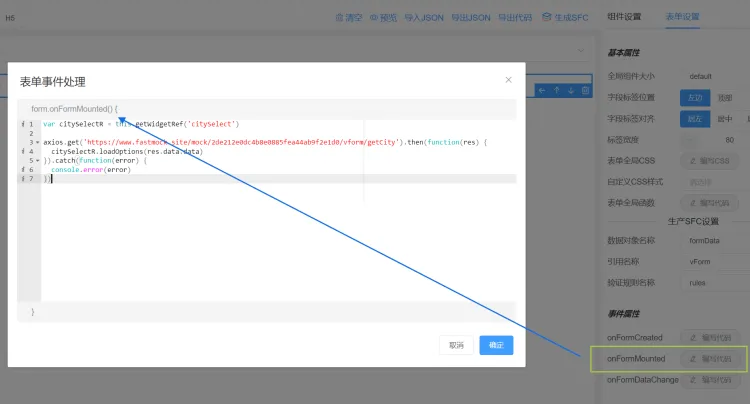
提示:也可在地区选择组件的onMounted事件中编写加载选项代码,效果一样。
(2)在地区选择组件的onChange事件中加载安装地组件的选项,并清空其对应的表单数据值,如下图所示:
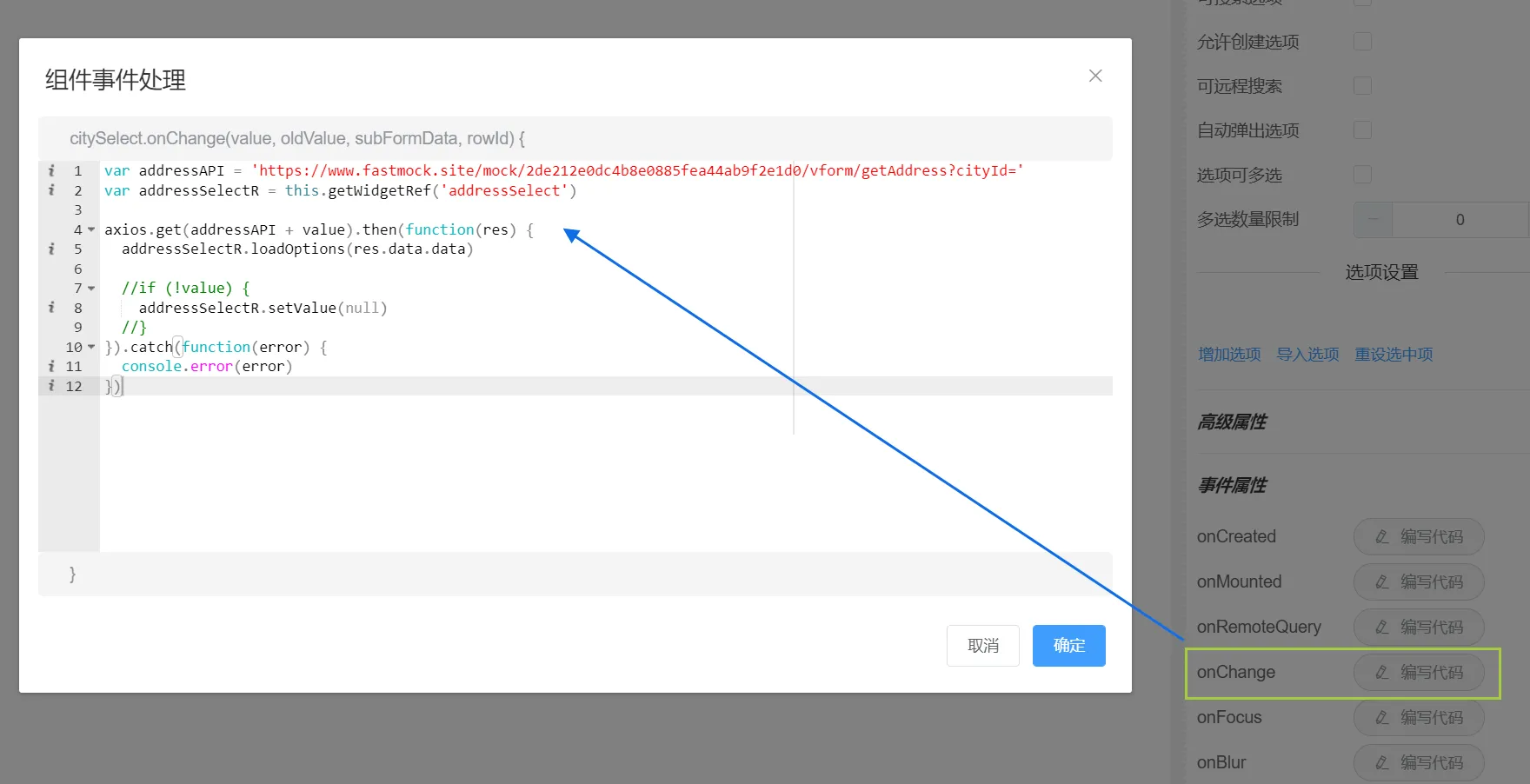
(3)点击表单设计器的预览按钮,即可测试选择联动效果。
同理可推,按照上述交互处理方式,可以实现三级、四级、五级等多级组件联动效果。