我的书签
我的书签
 添加书签
添加书签 移除书签
移除书签一.Springboot
1.Spring Boot、Spring MVC 和 Spring 有什么区别?
分别描述各自的特征:
Spring:框架就像一个家族,有众多衍生产品例如boot、security、jpa等等;但他们的基础都是Spring 的ioc和 aop,ioc提供了依赖注入的容器,aop解决了面向切面编程,然后在此两者的基础上实现了其他延伸产品的高级功能。
Spring MVC:提供了一种轻度耦合的方式来开发web应用;它是Spring的一个模块,是一个web框架;通过DispatcherServlet,ModelAndView和View Resolver,开发web应用变得很容易;解决的问题领域是网站应用程序或者服务开发——URL路由、Session、模板引擎、静态Web资源等等。
Spring Boot:实现了auto-configuration自动配置(另外三大神器actuator监控,cli命令行接口,starter依赖),降低了项目搭建的复杂度。它主要是为了解决使用Spring框架需要进行大量的配置太麻烦的问题,所以它并不是用来替代Spring的解决方案,而是和Spring框架紧密结合用于提升Spring开发者体验的工具;同时它集成了大量常用的第三方库配置(例如Jackson, JDBC, Mongo, Redis, Mail等等),Spring Boot应用中这些第三方库几乎可以零配置的开箱即用(out-of-the-box)。
所以,用最简练的语言概括就是:
Spring:是一个“引擎”;
Spring MVC:是基于Spring的一个 MVC 框架;
Spring Boot:是基于Spring的条件注册的一套快速开发整合包。
springboot的启动类入口
用过springboot的技术人员很显而易见的两者之间的差别就是视觉上很直观的:springboot有自己独立的启动类(独立程序)
@SpringBootApplicationpublicclassApplication {publicstaticvoidmain(String\[\] args) {SpringApplication.run(Application.class, args);}}
从上面代码可以看出,Annotation定义(@SpringBootApplication)和类定义(SpringApplication.run)最为耀眼,所以要揭开SpringBoot的神秘面纱,我们要从这两位开始就可以了。
SpringBootApplication接口用到了这些注解
@Target(ElementType.TYPE)// 注解的适用范围,其中TYPE用于描述类、接口(包括包注解类型)或enum声明@Retention(RetentionPolicy.RUNTIME)// 注解的生命周期,保留到class文件中(三个生命周期)@Documented// 表明这个注解应该被javadoc记录@Inherited// 子类可以继承该注解@SpringBootConfiguration// 继承了Configuration,表示当前是注解类@EnableAutoConfiguration// 开启springboot的注解功能,springboot的四大神器之一,其借助@import的帮助@ComponentScan(excludeFilters = {// 扫描路径设置@Filter(type = FilterType.CUSTOM, classes = TypeExcludeFilter.class),@Filter(type = FilterType.CUSTOM, classes = AutoConfigurationExcludeFilter.class) })public@interfaceSpringBootApplication {...}
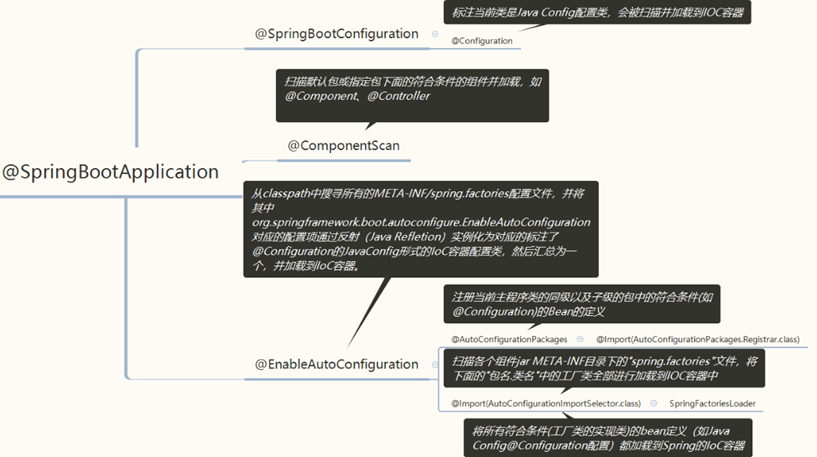
在其中比较重要的有三个注解,分别是:
1)@SpringBootConfiguration// 继承了Configuration,表示当前是注解类
2)@EnableAutoConfiguration// 开启springboot的注解功能,springboot的四大神器之一,其借助@import的帮助
3)@ComponentScan(excludeFilters = { //扫描路径设置(具体使用待确认)
接下来对三个注解一一详解,增加对springbootApplication的理解:
A)@Configuration注解
按照原来xml配置文件的形式,在springboot中我们大多用配置类来解决配置问题
配置bean方式的不同:
a)xml配置文件的形式配置bean
<?xml version="1.0"encoding="UTF-8"?><beans xmlns="http://www.springframework.org/schema/beans"xmlns:xsi="http://www.w3.org/2001/XMLSchema-instance"xsi:schemaLocation="http://www.springframework.org/schema/beans http://www.springframework.org/schema/beans/spring-beans-3.0.xsd"default-lazy-init="true"><!--bean定义--></beans>
b)java configuration的配置形式配置bean
@ConfigurationpublicclassMockConfiguration{//bean定义}
注入bean方式的不同:
a)xml配置文件的形式注入bean
<bean id="mockService">...</bean>
b)java configuration的配置形式注入bean
@ConfigurationpublicclassMockConfiguration{@BeanpublicMockService mockService(){returnnewMockServiceImpl();}}
任何一个标注了@Bean的方法,其返回值将作为一个bean定义注册到Spring的IoC容器,方法名将默认成该bean定义的id。
表达bean之间依赖关系的不同:
- xml配置文件的形式表达依赖关系
<bean id="mockService"><propery name ="dependencyService"ref="dependencyService"/></bean><bean id="dependencyService"></bean>
b)java configuration配置的形式表达依赖关系(重点)
如果一个beanA的定义依赖其他beanB,则直接调用对应的JavaConfig类中依赖beanB的创建方法就可以了。
@ConfigurationpublicclassMockConfiguration{@BeanpublicMockService mockService(){returnnewMockServiceImpl(dependencyService());}@BeanpublicDependencyService dependencyService(){returnnewDependencyServiceImpl();}}
2)@ComponentScan注解
作用:a)对应xml配置中的元素;
b)(重点)ComponentScan的功能其实就是自动扫描并加载符合条件的组件(比如@Component和@Repository等)或者bean定义;
c)将这些bean定义加载到IoC容器中.
我们可以通过basePackages等属性来细粒度的定制@ComponentScan自动扫描的范围,如果不指定,则默认Spring框架实现会从声明@ComponentScan所在类的package进行扫描。
注:所以SpringBoot的启动类最好是放在rootpackage下,因为默认不指定basePackages
3)@EnableAutoConfiguration
此注解顾名思义是可以自动配置,所以应该是springboot中最为重要的注解。
在spring框架中就提供了各种以@Enable开头的注解,例如:@EnableScheduling、@EnableCaching、@EnableMBeanExport等;@EnableAutoConfiguration的理念和做事方式其实一脉相承简单概括一下就是,借助@Import的支持,收集和注册特定场景相关的bean定义。
@EnableScheduling是通过@Import将Spring调度框架相关的bean定义都加载到IoC容器【定时任务、时间调度任务】
@EnableMBeanExport是通过@Import将JMX相关的bean定义加载到IoC容器【监控JVM运行时状态】
@EnableAutoConfiguration也是借助@Import的帮助,将所有符合自动配置条件的bean定义加载到IoC容器。
@EnableAutoConfiguration作为一个复合Annotation,其自身定义关键信息如下:
@SuppressWarnings("deprecation")@Target(ElementType.TYPE)@Retention(RetentionPolicy.RUNTIME)@Documented@Inherited@AutoConfigurationPackage【重点注解】@Import(AutoConfigurationImportSelector.class)【重点注解】public@interfaceEnableAutoConfiguration {...}
其中最重要的两个注解已经标注:
- @AutoConfigurationPackage【重点注解】
- @Import(AutoConfigurationImportSelector.class)【重点注解】
当然还有其中比较重要的一个类就是:
AutoConfigurationImportSelector.classAutoConfigurationPackage注解:@Target(ElementType.TYPE)@Retention(RetentionPolicy.RUNTIME)@Documented@Inherited@Import(AutoConfigurationPackages.Registrar.class)public@interfaceAutoConfigurationPackage {}[通过@Import(AutoConfigurationPackages.Registrar.class)](mailto:通过@Import(AutoConfigurationPackages.Registrar.class))Static classRegistrarimplementsImportBeanDefinitionRegistrar, DeterminableImports {@OverridepublicvoidregisterBeanDefinitions(AnnotationMetadata metadata,BeanDefinitionRegistry registry) {register(registry,newPackageImport(metadata).getPackageName());}……}
注册当前启动类的根package;
注册org.springframework.boot.autoconfigure.AutoConfigurationPackages的BeanDefinition。
项目中注解
@Service用于标注业务层组件
@Controller用于标注控制层组件,项目中使用@RestController
@Repository用于标注数据访问组件,即DAO组件
@Component泛指组件,当组件不好归类的时候,我们可以使用这个注解进行标注。
@Servicepublic class VentorServiceImpl implements iVentorService {}
@Repositorypublic class DaoSupport implements Dao {}
4.以下是easyloan-system的启动
@EnableSwagger2@EnableEurekaClient@EnableFeignClients(basePackages = {"com.git.easyloan"})@EnableTransactionManagement@ImportResource(value = "rules/ruleEngine\_beans.xml")@ComponentScan(basePackages = {"com.git.easyloan", "javacommon.coreframe"})@EnableAsync@SpringBootApplication@EnableCachingpublic class Application {public static void main(String\[\] args) {Class<?>\[\] classes = {Application.class, ApplicationContextHolder.class, SecurityContextHolder.class};SpringApplication springApplication = new SpringApplication(classes);springApplication.addListeners(new StartUpListener());springApplication.run(args);//初始化线程池PoolHelpUtil poolHelpUtil = new PoolHelpUtilImpl();try {ThreadPool pool = ThreadPool.getInstance(poolHelpUtil);} catch (Exception e) {e.printStackTrace();}}}
平台介绍
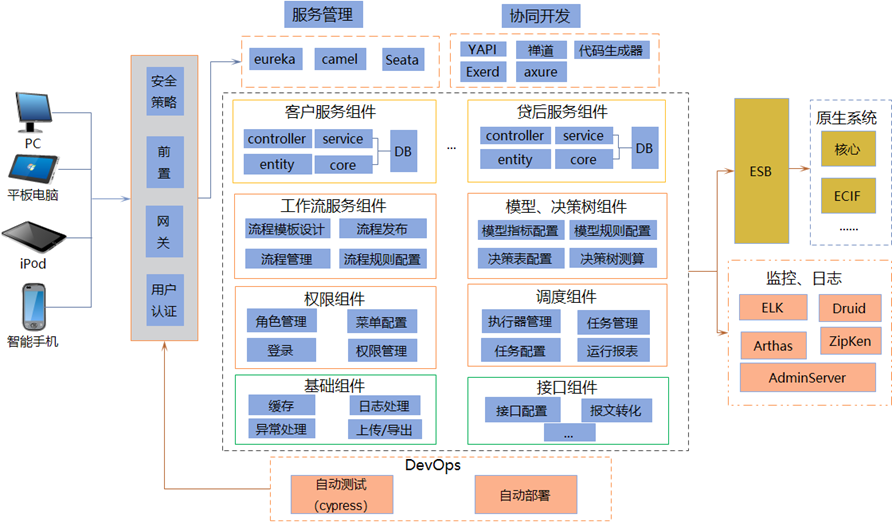
1.平台架构
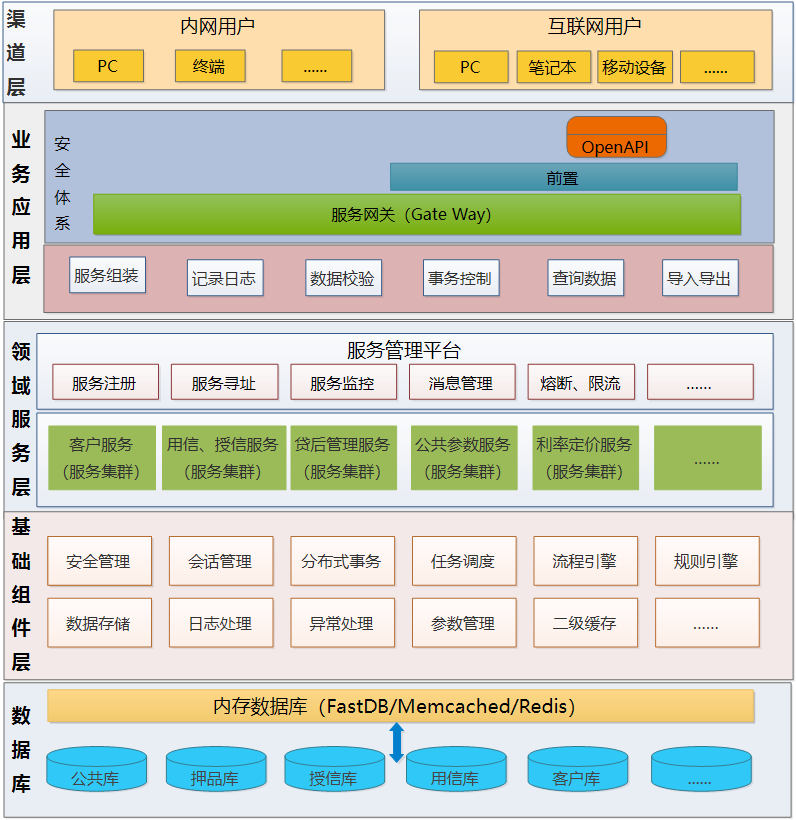
2.应用架构
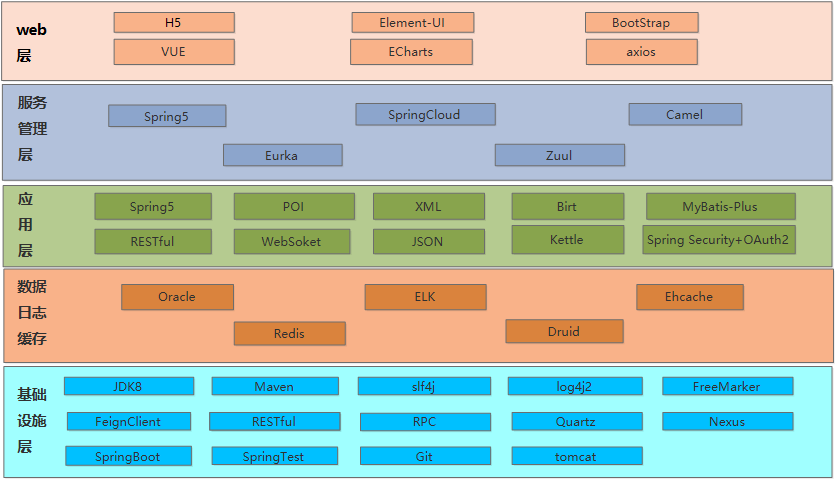
3.技术架构
子系统介绍
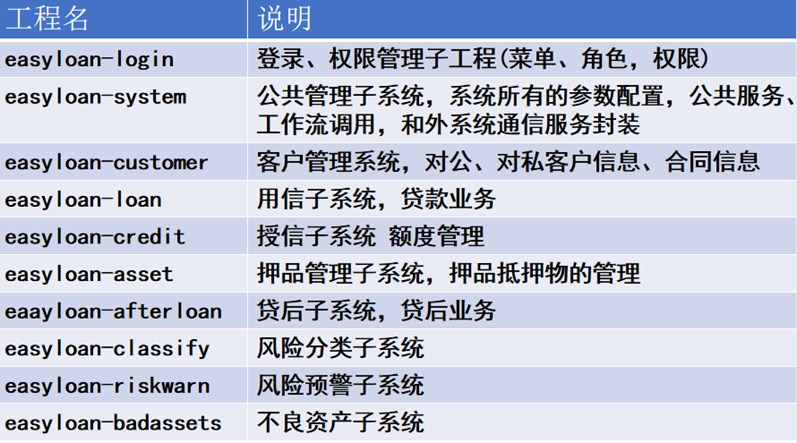
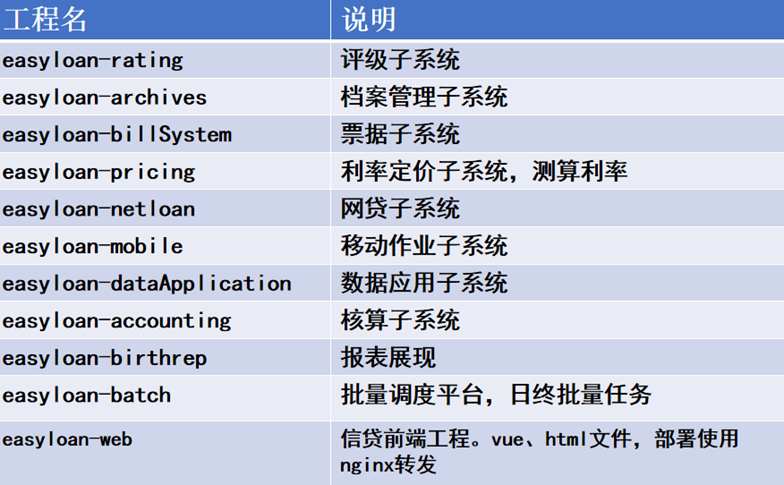
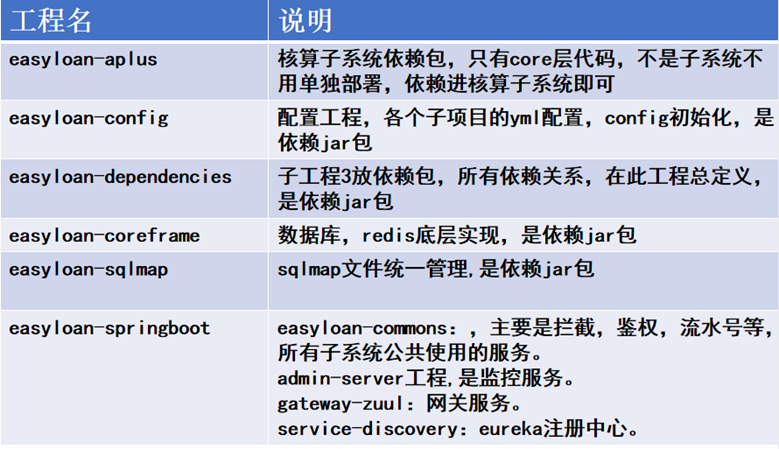
项目依赖结构
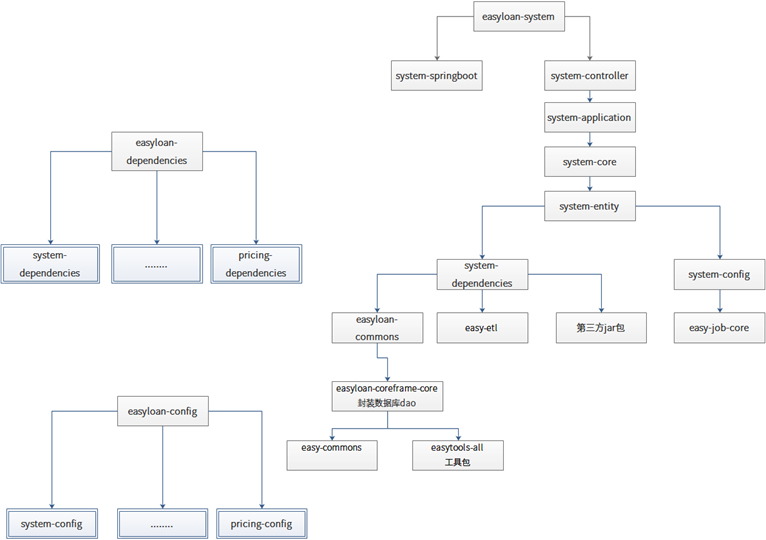
- Easyloan-dependencies:系统依赖包模块
system-dependencies…… pricing-dependencies:各个子系统的依赖,都统一依赖easyloan-dependencies
- Easyloan-config:配置中心模块,和dependencies类似。System-config……pricing-configg各个子系统的配置模块,管理存放各自系统的启动参数。统一依赖easyloan-config
- Easyloan-commons:公共依赖包,存放公共业务程序
- Easyloan-coreframe-core: 数据库dao封装层
- Easy-commons:底层公共包,pageData就在此包
- Easytools-all:三方工具包,文件操作,io操作,日期操作等工具类。
- Easy-etl:多线程封装
- Easy-job-core:日终调度
Config中的yml配置文件
spring:datasource:druid:stat-view-servlet:url-pattern: /druid/\*login-username: adminlogin-password: adminenabled: truereset-enable: trueallow:web-stat-filter:url-pattern: /\*exclusions: "\*.js,\*.gif,\*.jpg,\*.png,\*.css,\*.ico,/druid/\*"enabled: truefilter:stat:slow-sql-millis: 1000log-slow-sql: trueenabled: trueconnection-properties: druid.stat.mergeSql=true;druid.stat.slowSqlMillis=5000master:DbType: com.alibaba.druid.pool.DruidDataSourcedriver-class-name: oracle.jdbc.driver.OracleDriverurl: jdbc:oracle:thin:@dbIP:dbPort/loandbusername: usernamepassword: passwordinitialSize: 50maxActive: 100filters: statminIdle: 5maxWait: 60000poolPreparedStatements: truemaxPoolPreparedStatementPerConnectionSize: 20ValidationQuery: select 'x' from dualValidationQueryTimeout: 3000testOnBorrow: falsetestOnReturn: falsetestWhileIdle: truetimeBetweenEvictionRunsMillis: 60000minEvictableIdleTimeMillis: 300000maxOpenPreparedStatements: 20removeAbandoned: trueremoveAbandonedTimeout: 1800logAbandoned: trueslave:DbType: com.alibaba.druid.pool.DruidDataSourcedriver-class-name: oracle.jdbc.driver.OracleDriverurl: jdbc:oracle:thin:@dbIP:dbPort/loandbusername: usernamepassword: passwordinitialSize: 50maxActive: 100filters: statminIdle: 5maxWait: 60000poolPreparedStatements: truemaxPoolPreparedStatementPerConnectionSize: 20ValidationQuery: select 'x' from dualValidationQueryTimeout: 3000testOnBorrow: falsetestOnReturn: falsetestWhileIdle: truetimeBetweenEvictionRunsMillis: 60000minEvictableIdleTimeMillis: 300000maxOpenPreparedStatements: 20removeAbandoned: trueremoveAbandonedTimeout: 1800logAbandoned: trueservlet:multipart:max-file-size: 50MBmax-request-size: 100MBredis:cluster:nodes:ip1:port1,ip2:port2,ip3:port3,ip4:port4,ip5:port5,ip6:port6maxAttempts: 20max-redirects: 3timeout: 2500password:lettuce:pool:max-active: 2000max-idle: 2000min-idle: 0zipkin:base-url: http://zipkinIp:9411mapper:mappers:\- tk.mybatis.mapper.common.MappernotEmpty: truelogging:config: classpath:my-logback-spring.xmllog:path: /app/tomcat/scms/logslevel: INFOsize: 5GBsql: debuginit:params: params-cms-graylist@TbCmnGraylistMapper.initAll,params-cms-AftTipsConfig@TbCmnAftTipsConfigMapper.listAllribbon:ReadTimeout: 70000ConnectTimeout: 70000eureka:enabled: true#jwtjwt:header: Authorizationsecret: mySecret\# token 过期时间 2个小时expiration: 360000000auth:\# 授权路径path: /api/v1/system/login\# 获取用户信息account: /api/v1/system/loginfeign:hystrix:enabled: falsehttpclient:connection-timeout: 70000max-connections-per-route: 1000max-connections: 3000enabled: trueclient:default-config: defaultgateway:url:system:credit:loan:customer:riskwarn:aplus:archives:asset:badassets:billSystem:classify:dataApplication:rating:mobile:afterloan:server:name:system: EASYLOAN-SYSTEMcredit: EASYLOAN-CREDITloan: EASYLOAN-LOANcustomer: EASYLOAN-CUSTOMERriskwarn: EASYLOAN-RISKWARNaplus: EASYLOAN-APLUSarchives: EASYLOAN-ARCHIVESasset: EASYLOAN-ASSETbadassets: EASYLOAN-BADASSETSbillSystem: EASYLOAN-BILLSYSTEMclassify: EASYLOAN-CLASSIFYdataApplication: EASYLOAN-DATAAPPLICATIONrating: EASYLOAN-RATINGmobile: EASYLOAN-MOBILEafterloan: EASYLOAN-AFTERLOANtomcat:max-threads: 2000max-connections: 2000min-spare-threads: 10connection-timeout: 70000compression:mime-types: application/json,application/xml,text/html,text/xml,text/plainenabled: truemin-response-size: 512\# 规则引擎外置目录配置rule:basePath: /app/tomcat/scms/easyloan/rules/system#upload:\# epaaPath: /app/scms/datafile/recv/epaa/snowflake:data: 0bizType: order\_id\_easy:job:admin:addresses: http://jobIP:9090\### easy-job executor addressexecutor:appname: easy-job-executor-systemip:port: 9980\### easy-job log pathlogpath: /app/tomcat/deploy/log/jobhandler\### easy-job log retention dayslogretentiondays: -1\### easy-job, access tokenaccessToken:writeList: /app/tomcat/scms/easyloan/writeList.propertiesproperties:path: /app/tomcat/scms/easyloan/dataSource.properties\# resTemplateresT:maxtotal: 5000maxper: 2000readTimeOut: 55000connectTimeout: 55000connectionRequestTimeout: 30000validateAfterInactivity: 100000transule:rulePath: /app/tomcat/scms/easyloan/rule.propertiesrepeatFlag: 3service:list:map:jwtWriteUrl: /tbPubOperaLog/saveTransLog